Grocery retail chain, EU & US (under NDA) · Retail · Finance
Document AI that reads 1 300 supplier invoices a day
Scans and photos of invoices, delivery notes and acts go through a multimodal model that extracts typed fields with a confidence score per field, reconciles them with the supplier and contract master data, and posts to the ERP. Only low-confidence documents reach a human — roughly one in nine.
- Duration
- 4 months to production
- Published
- 26 August 2026
- Stack
- PythonPyTorchMultimodal LLMPostgreSQLRabbitMQVueERP APIDocker
88%
straight-through, no human touch
−6.5 h
of manual entry saved every day
98.6%
field accuracy on totals and VAT IDs
38 s
average review of a flagged document
What was the starting point?
The starting point was an accounts-payable team retyping more than 200 supplier documents a day — scanned invoices, photographed delivery notes and acts in three languages, with a dozen layouts per supplier. At roughly two minutes per document that was more than six person-hours of pure transcription a day, plus the inevitable typos in amounts and VAT IDs. The pattern is common: Ardent Partners’ annual State of ePayables research (2024) reports that a large share of invoices still arrive as paper or PDF and that manual processing costs many times more per invoice than automated processing.
The initiative scored 4/5 on data readiness in Glanit’s AI registry: the documents existed, an ERP test environment was available, and 200 reference documents with verified field values could be prepared in a week. It went into the first wave of pilots.
What problem had to be solved?
The problem was not “recognise text” but “never post a wrong amount”. Classic OCR reads characters; it does not understand that “Total” on one supplier’s layout sits in the bottom-right table while on another it is a line in the footer. Template-based extraction breaks every time a supplier changes its format — which is why Gartner (2023) describes the market moving from template OCR to intelligent document processing that combines layout models and language models. For the finance team the real requirement made confidence estimation and human-review design as important as the extraction model itself.
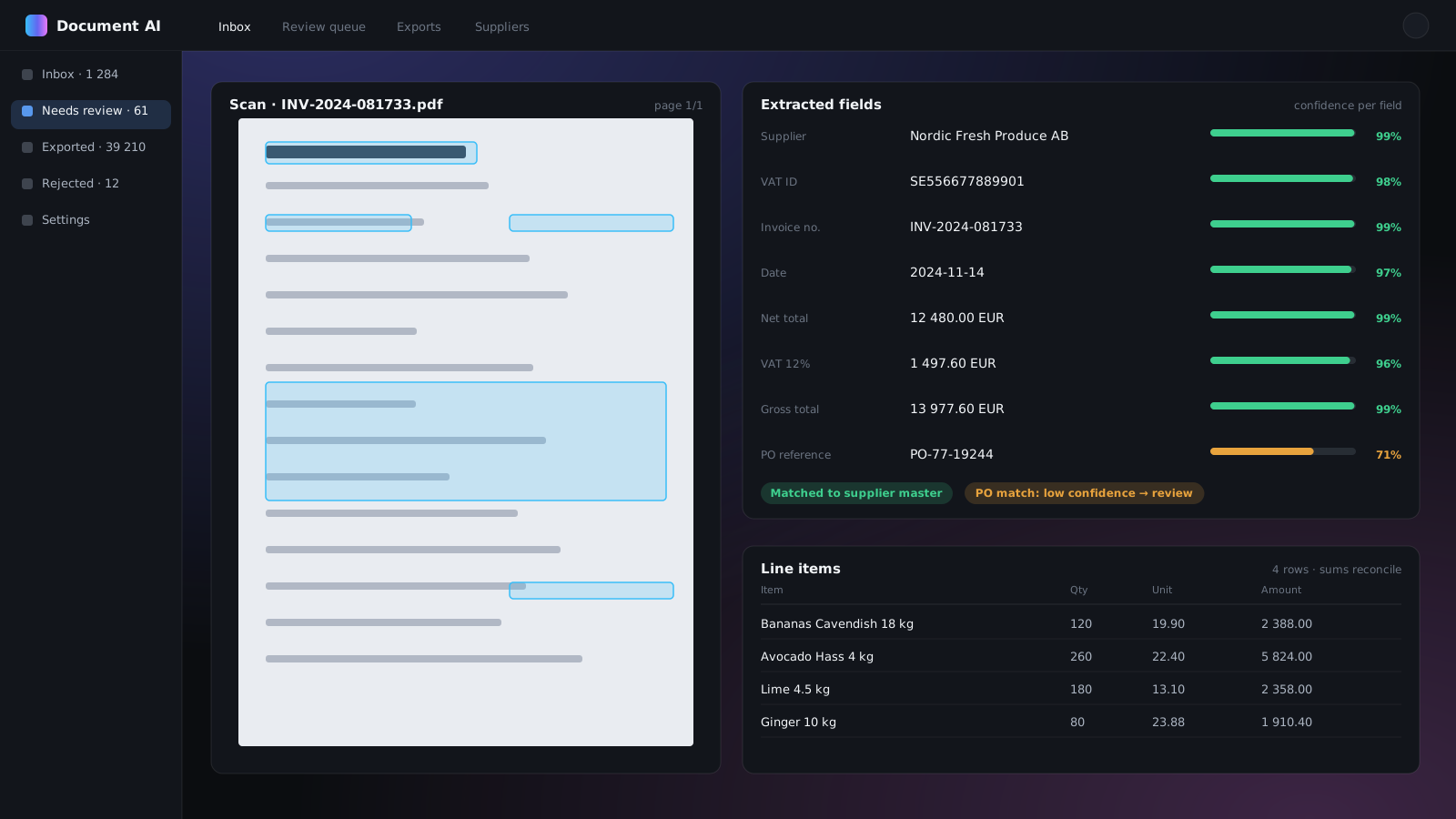
Extraction with a confidence score per field
The operator sees the scan and the extracted fields side by side. Green fields are above the auto-post threshold; amber ones need a click. Line items are reconciled against the totals before anything reaches the ERP.
How was it built?
It was built as a queue-based pipeline: intake and image normalisation, a multimodal model that returns typed fields with a per-field confidence, reconciliation against master data, a human review queue for anything below threshold, and posting to the ERP with the scan attached. Human-in-the-loop is by design, not a fallback: Deloitte’s global intelligent-automation survey (2022) found that most organisations pursuing automation still combine it with human checks, and the finance team’s tolerance for a wrong posting was zero.
- Intake. Documents arrive from network scanners, a mailbox and a shared folder; a queue normalises images (deskew, dewarp for phone photos, page splitting).
- Understanding, not just OCR. A multimodal model reads the document as a whole and returns counterparty, VAT ID, number, date, net/VAT/gross and line items as structured JSON with a per-field confidence and the source region on the page.
- Reconciliation. Extracted values are matched against the supplier master, contracts and purchase orders; line items must sum to the totals. A document that fails any check is routed to review with the failing rule highlighted.
- Review queue. The scan and pre-filled fields side by side; the operator confirms or corrects. Every correction is stored as training data.
- ERP posting. Confirmed documents are posted through the ERP API with the source scan attached; each document keeps a full audit trail from intake to posting.
Template OCR vs multimodal extraction: what changes?
The table shows why the project did not start from template-based OCR. Templates work when layouts are few and stable; here there were a dozen layouts per supplier and they changed. The multimodal model reads the page as a whole, so a new layout is a new example, not a new template — and it returns a confidence per field, which is what makes a review threshold possible.
| Criterion | Template OCR | Multimodal model + reconciliation |
|---|---|---|
| New supplier layout | Configure a template | Works out of the box, improves from corrections |
| Photos from a phone | Fails without perfect alignment | Dewarp + model reads context |
| Confidence per field | No | Yes, drives the review threshold |
| Line items | Fragile table rules | Extracted and checked against totals |
| Wrong-amount risk | Silent errors | Rule failures routed to a human |
| Straight-through rate here | Not reached in the earlier trial | 88% after twelve months |
Results
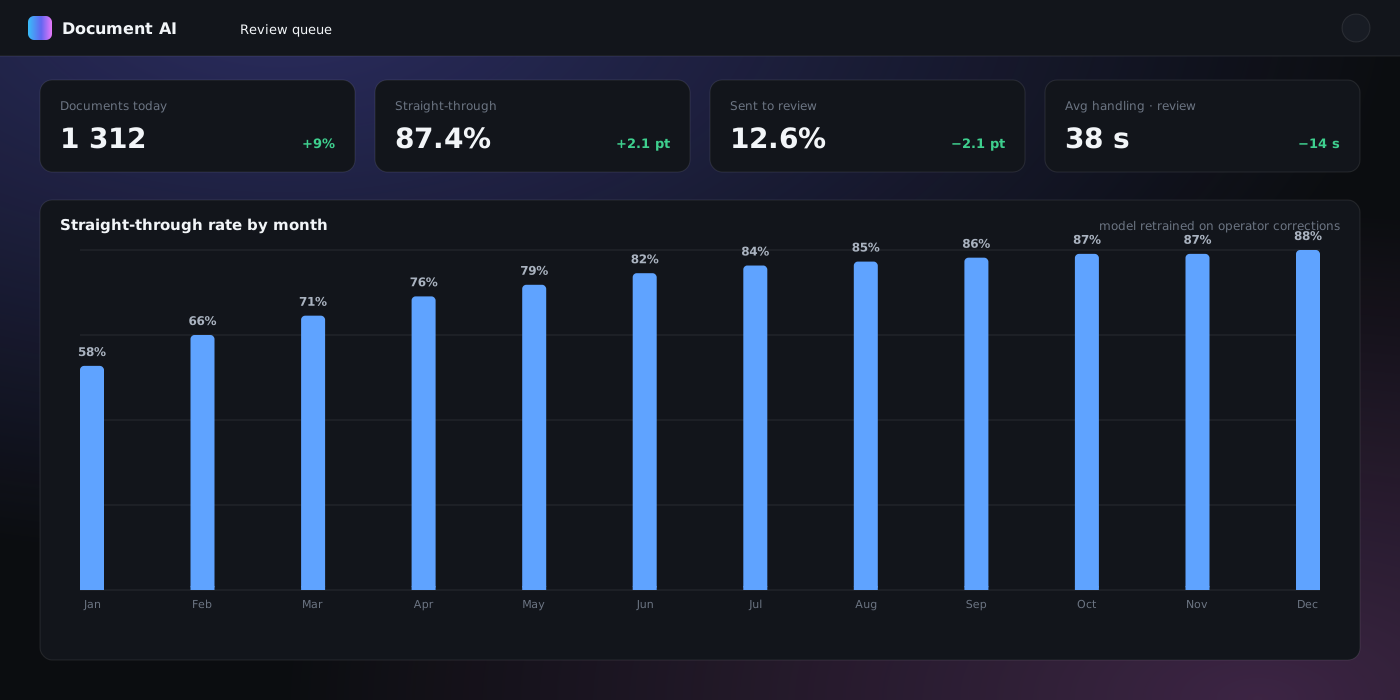
The straight-through rate — documents posted with no human touch — started at 58% on launch and rose month by month as the model was retrained on operator corrections. Field accuracy is measured on a monthly audit sample against the ERP.
Data table
| Straight-through | |
|---|---|
| M1 | 58% |
| M2 | 66% |
| M3 | 71% |
| M4 | 76% |
| M5 | 79% |
| M6 | 82% |
| M7 | 84% |
| M8 | 85% |
| M9 | 86% |
| M10 | 87% |
| M11 | 87% |
| M12 | 88% |
PO reference is the hardest field: it is often handwritten or missing on the document.
Data table
| Accuracy | |
|---|---|
| Gross total | 99.1% |
| VAT ID | 98.6% |
| Invoice number | 98.4% |
| Date | 98.2% |
| Net total | 97.9% |
| PO reference | 95.8% |
| Line items | 94.7% |
The review queue
Twelve percent of documents still reach a human — but a review now takes 38 seconds instead of two minutes of typing, because the operator confirms rather than transcribes.
Stack
Python workers on RabbitMQ; a multimodal LLM for document understanding with a fine-tuned layout model for region detection; PostgreSQL for documents, fields and the audit trail; a Vue review interface; ERP integration through the vendor API. Runs in Docker on the client's infrastructure; documents are processed inside the corporate perimeter.
Who is this approach for?
This approach is for any finance, logistics or insurance team with a high flow of documents in diverse layouts: invoices, delivery notes, customs declarations, insurance claims, loan applications. The pattern is always the same — extract with confidence, reconcile against what you already know, and let people handle only the exceptions. The regulatory direction is the same: structured e-invoicing has been mandatory in EU public procurement since Directive 2014/55/EU, and the VAT in the Digital Age package adopted in 2025 extends digital reporting to cross-border B2B invoices over the coming years, so a pipeline that already produces typed, reconciled data is a step towards that rather than a stopgap.
Frequently asked questions
Services behind this case
Services
AI & Machine Learning
AI agents, LLM pipelines with retrieval, forecasting, computer vision and document AI — built into your product and measured by before/after numbers.
AI & Machine Learning
Free Open-Source AI Chatbot for Business Automation
Discover Glanit's open-source AI chatbot solution. Automate customer support 24/7 using Grok, Gemini, and ChatGPT. A self-hosted, free alternative to expensive SaaS tools—pay only for API usage.
AI & Machine Learning
How AI agents work: architecture of a production agent
An AI agent is not a chatbot with a longer prompt. It is a system: a model for reasoning wrapped in perception, memory, tools, orchestration and monitoring. We build agents for clients and for our own products — this is the architecture behind them.
More case studies
AI knowledge assistants for a 30 000-employee grocery chain
Three RAG assistants on one platform — for commercial staff, store directors (by voice, from the shop floor) and HR — answer questions from corporate regulations with a citation to the exact clause, or say honestly that they do not know — so staff stop phoning head office for routine questions.
- Retail
- Python
- LangChain
- PostgreSQL + pgvector
Catalogue AI: classifying new SKUs and cleaning 182 000 product cards
Two models on the product catalogue of a grocery chain: one suggests the classification code and category for every new item with top-3 probabilities, the other finds duplicate product cards semantically. Category managers confirm with one click instead of searching the classifier by hand; every confirmation feeds back into training.
- Retail · Master data
- Python
- scikit-learn
- Sentence Transformers
Voice of customer: 12 review sources, one AI-classified stream
Reviews from maps, app stores, social networks, the hotline and the in-store complaint book flow into one system that classifies each by topic, sentiment, store and severity, escalates critical ones to the responsible manager within minutes, and gives management a live, per-store picture instead of a monthly digest.
- Retail · Customer experience
- Python
- Transformers
- PostgreSQL